Create Django Models for the Blog API
Before jumping into coding, it is a good idea to create some design and document it. The minimum required documentation for our project is a database diagram for our Blog API project.
There are many tools on the market for creating diagrams, but I believe the best way is to use diagram as code tools. Mermaid provides very good support for creating diagrams using code-like description. Mermaid also provides Mermaid Live Editor - an online tool for creating diagrams.
Setup Sphinx for Mermaid
Create E-R diagram for our Blog API
Pre-requisites
Requires the Custom Django User Model guide to be completed.
Guide code:
create-django-models branch in the GitHub repository.
Setup Sphinx for Mermaid
Install Sphinx extension
Add sphinxcontrib-mermaid to the documentation dependencies in docs/requirements.txt:
recommonmark
sphinx
sphinx-autobuild
sphinxcontrib-mermaid
Update the project dependencies installation:
pip install -U -r requirements.txt
Configure Sphinx to use the extension
Add the sphinxcontrib.mermaid extension to the list of extensions in the docs/conf.py file:
extensions = [
    "recommonmark",
    "sphinxcontrib.mermaid",  # new
]
Create a simple diagram
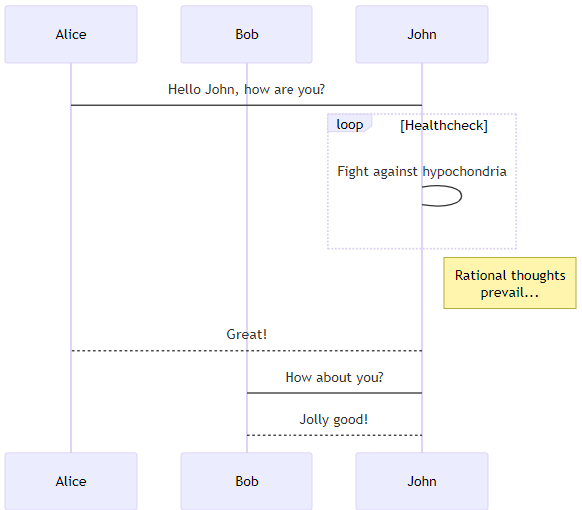
Open a Sphinx document and add following content:
.. mermaid::

    sequenceDiagram
        participant Alice
        participant Bob
        Alice->John: Hello John, how are you?
        loop Healthcheck
            John->John: Fight against hypochondria
        end
        Note right of John: Rational thoughts <br/>prevail...
        John-->Alice: Great!
        John->Bob: How about you?
        Bob-->John: Jolly good!
After building the project documentation, you should be able to see:
Configure ReadTheDocs for Mermaid
In order to be able to generate Mermaid diagrams in PDF files, you need to update the .readthedocs.yaml:
build:
  os: ubuntu-22.04
  tools:
      python: "3.12"
      nodejs: "19"

  jobs:
      post_install:
        - npm install -g @mermaid-js/mermaid-cli
In your documentation directory add file puppeteer-config.json with contents:
{
    "args": ["--no-sandbox"]
}
In your documentation docs/conf.py file, add:
mermaid_params = ['-p', 'puppeteer-config.json']
Create E-R diagram for our Blog API
To learn more about E-R diagrams with Mermaid, go to Mermaid documentation on Entity Relationship Diagrams.
Instead of Mermaid, you could try using plant uml through the PlantUML extension.
Here is the diagram I came with:
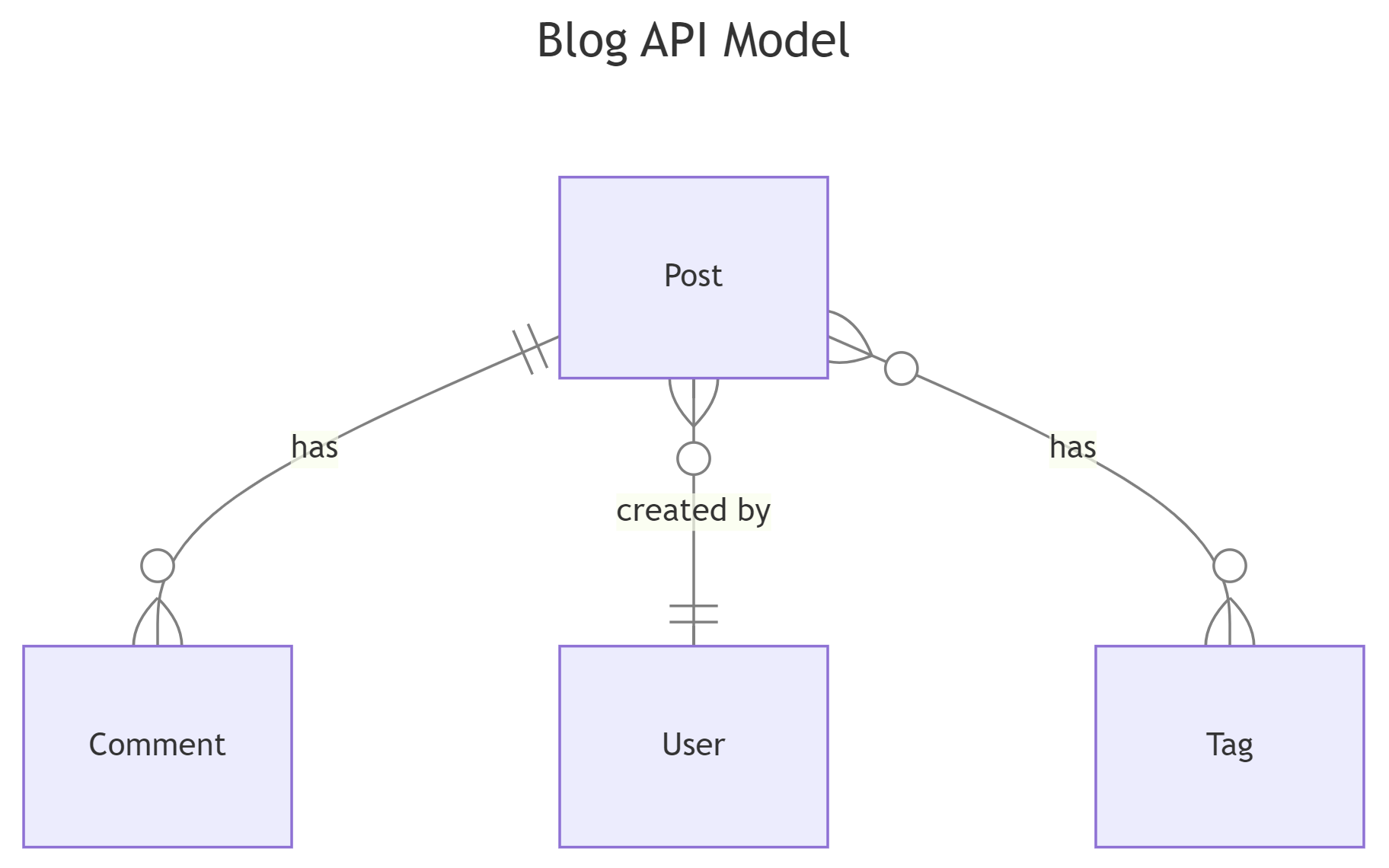
.. mermaid::

    ---
    title: Blog API Model
    ---
    erDiagram
        Post ||--o{ Comment : "has"
        Post }o--|| User : "created by"
        Post }o--o{ Tag : has
Create Posts App
python manage.py startapp posts
# django_project/settings.py
INSTALLED_APPS = [
    # ..............
    # Local
    "accounts.apps.AccountsConfig",
    "posts.apps.PostsConfig", # new
]
Create Posts Model
# posts/models.py
from django.conf import settings
from django.db import models


class Post(models.Model):
    title = models.CharField(max_length=50)
    body = models.TextField()
    author = models.ForeignKey(settings.AUTH_USER_MODEL, on_delete=models.CASCADE)
    created_at = models.DateTimeField(auto_now_add=True)
    updated_at = models.DateTimeField(auto_now=True)

    def __str__(self):
        return self.title
python manage.py makemigrations posts
python manage.py migrate
# posts/admin.py
from django.contrib import admin

from .models import Post

admin.site.register(Post)
Practice with Posts
Let’s create a user:
python manage.py shell
>>> from accounts.models import CustomUser
>>> CustomUser.objects.create(username="ivan")
<CustomUser: ivan>
Let’s add some posts:
python manage.py shell
>>> from accounts.models import CustomUser
>>> from posts.models import Post
>>> u = CustomUser.objects.get(username="ivan")
>>> Post.objects.create(title="Hello, World!", body="It's a lovely day, isn't it?", author=u)
<Post: Hello, World!>
>>> Post.objects.create(title="Second Post", body="This is my second post.", author=u)
<Post: Second Post>
Create Comments Model
# posts/models.py
# ....
class Comment(models.Model):
    post = models.ForeignKey(Post, on_delete=models.CASCADE, related_name="comments")
    body = models.TextField()
    author = models.ForeignKey(settings.AUTH_USER_MODEL, on_delete=models.CASCADE)
    created_at = models.DateTimeField(auto_now_add=True)
    updated_at = models.DateTimeField(auto_now=True)

    def __str__(self):
        label = truncate_with_elipsis(self.body, 50)
        return f"{self.author.username}: {label}"
python manage.py makemigrations posts
python manage.py migrate
# posts/admin.py
from django.contrib import admin

from .models import Comments, Post

admin.site.register(Post)
admin.site.register(Comment)
Practice with Comments
python manage.py shell
>>> from accounts.models import CustomUser
>>> from posts.models import Comment, Post
>>> u = CustomUser.objects.get(username="ivan")
>>> p = Post.objects.get(title="Second Post")
>>> Comment.objects.create(body="comment 1", author=u,post=p)
<Comment: ivan=comment 1>